Showing posts with label NOKIA 110. Show all posts

Sunday, April 21, 2013

Nokia 110 Local Mode Test Mode Problem Repair Solution

Google
Nokia 110 Test Mode Local Mode
Problem Solution can be found in
this diagram simply remove these
two resistance bake of the battery
terminal and if there is any rust
and set is water damage clean the
whole set with electronics cleaner
and leave it to dry for a few mints.
In Nokia 110 Local Mode or Nokia
110 Test Mode problems occur
because of the Software Problems,
in some cases it may be caused by
hardware problems too. Whenever
you get this problem First thing
you should do is Flash your phone
with same or Latest Firmware of
the Cell Phone available at the
time. Then write a good Permanent
Memory(PM) file of your phone.
Then Do a complete Unlock and
check if the Problem is solved.
Before Doing any hardware
solution you should clean the
Motherboard of the Mobile Phone.
Please Note that we will edit these
solutions or add new ones if found
in this page at any time in the
future. So feel free to come back
any time on this page to stay up to
date.
Here Are Mode Problem Test Mode
Solution. Please Observe Carefully.
If you have further Questions
please don’t hesitate to leave a
comment.

Monday, April 15, 2013

Nokia 110 111 Mmc Memory Card Problem Ways Jumper Solution

Google
Nokia 110 111 Memory Card
Problem Repairing Solutions are
available in the following article.

Also you will find Nokia 110 111
Mmc Ways and Jumpers
information in the diagrams further
in this post.
This solution works on
all Nokia 110 RM-827, Nokia 1100
RM-810, Nokia 111 RM-811 and
Nokia 1110 RM-871.

In Nokia 110 111 Memory Card
Problem can occur because of the
broken MMC Jacket. You can
replace the MMC Jacket but if in
any case the prints are broken you
can Jumper the Memory Card
Jacket to the points as shown in
further diagram.
Please Note that we will edit these
solutions or add new ones if found
in this page at any time in the
future. So feel free to come back
any time on this page to stay up to
date.
If you have further Questions
please don’t hesitate to leave a
comment.


Nokia 110 111 Insert Sim Card Solution

Google

Nokia 110 111 Insert Sim Card
Problem Repairing Solutions are
available in the following
article. Also you will find Nokia 110
111 Insert Sim Ways and Jumpers
information in the diagrams further
in this post.This solution works on
all Nokia 110 RM-827, Nokia 1100
RM-810, Nokia 111 RM-811 and
Nokia 1110 RM-871.
In Nokia 110 111 Insert Sim
Problem can occur because of the
faulty Sim Card Connector, Sim IC
or it’s bad connection to the Cell
Phone’s Motherboard. Bad
connections can happen for many
reasons like if it’s dropped or got
wet, bad connection may also
happen because of Carbon, Rust or
even Dirt. So first of all you should
clean Nokia 110 111 Sim Card
Ways Track , Sim IC, Sim Card
Connector and Motherboard of the
Mobile Phone.
You Can Use any cleaning liquid for
this purpose like CTC or any other
you prefer. If you are certain that
the bad connection is not the
reason for your Mobile Phone’s
fault, then you can replace the Sim
Card Connector, Sim IC with a new
one.
Please Note that we will edit these
solutions or add new ones if found
in this page at any time in the
future. So feel free to come back
any time on this page to stay up to
date.
If you have further Questions
please don’t hesitate to leave a
comment.q

Monday, April 8, 2013

Nokia 112 And 110 New Usb Pinout

Google

Nokia 112 And 110 New Usb Pinout
Nokia 112 And 110 New Usb Flash
Pinout
Nokia 110 Pinout
Nokia 112 pinout

Friday, April 5, 2013

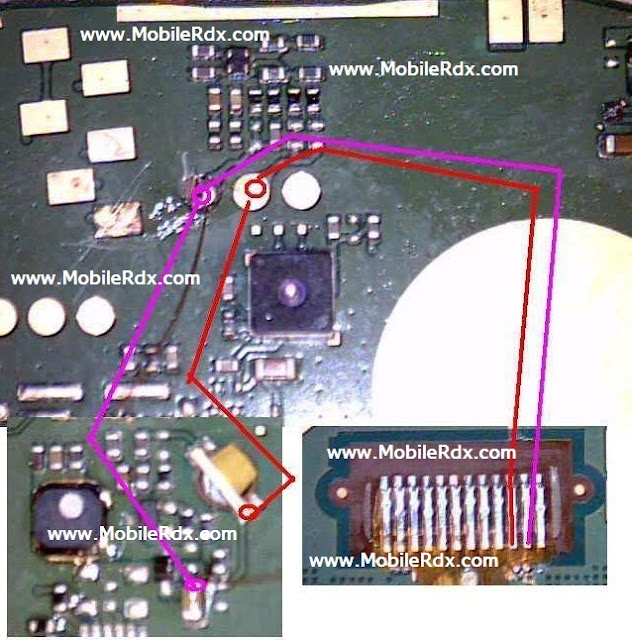
Nokia 110 And 112 Lcd LightJumper Solution

Google
Nokia 112 and Nokia 110 Light
Solution Ways and Jumper points
are in this article. If your phone’s
Lcd Display lights are not working
make the jumper as shown in the
diagram below. This solution works
on all Nokia 110 , Nokia
111
and Nokia 112.


First of all before making any
hardware solutions clean the area
behind LCD connector and the
whole motherboard to make sure
that rust or carbon is not causing
this problem. I have marked Nokia
112 and Nokia 110 light ways
jumper points in the following
diagram. If jumper does not work
replace the marked component.
Also try replacing the LCD itself
because sometime damaged LCD
can cause this problem.
Please Note that we will edit these
solutions or add new ones if found
in this page at any time in the
future. So feel free to come back
any time on this page to stay up to
date.
If you have further Questions
please don’t hesitate to leave a
comment.
Note: Every diagram we post on
mobilerdx.com is tested by one or
more members of our team. Still
Use them at Your Own Risk we are
not responsible if these solutions
may cause any harm to your
phone.

Saturday, December 15, 2012

Nokia 110 set dead solution 100% OK

Google

Nokia 110 set dead solution 100% OK


            If your set did not on with battery but flashing tools show software is ok . Then use this solution and make money.


Friday, November 23, 2012

Nokia 110 display tracks solution

Google
Nokia 110 white display solutionNokia 110 lcd tracksNokia 110 display light waysNokia 110 full display ways


First in the world Nokia 110 Lcd Tracks by GAURAV-MOBILE


Nokia 110 mic solution

Google
Nokia 110 mic tracks 
Nokia 110 outgoing voice problem
Nokia 110 mic ways
Nokia 110 mic problem


First in the world Nokia 110 Mic Solution by GAURAV-MOBILE


Random Posts

Blogger Widgets